Renew Your Plan

If you chose to auto renew at the end of your plan year 2026 BeWell application, you will not need to worry about renewing your plan next year. That will happen automatically.  

If you did not choose to auto renew, but still need insurance for the next plan year, you will need to fill out a new application. 

If you had a plan in 2026:

If you had a plan through BeWell in 2026 and chose not to auto enroll, you can log back in to your account during open enrollment to re-apply and shop for plans.

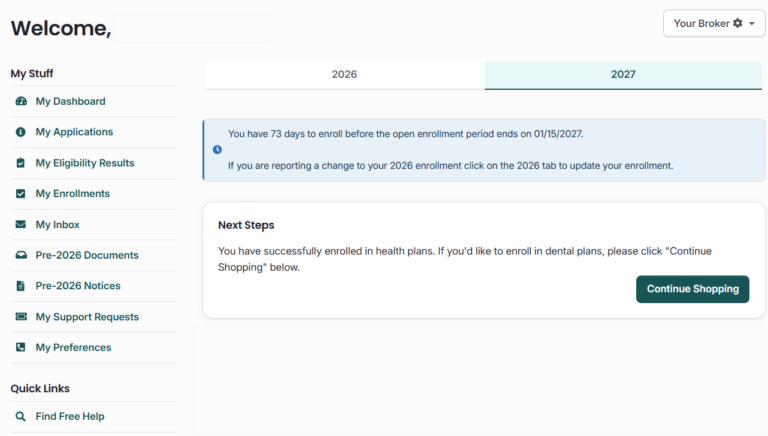
If you are making changes to your health insurance plan during Open Enrollment, make sure you select the correct plan year before making any updates.

At the top of your Dashboard, you’ll see two tabs: one for your current plan year and one for the upcoming plan year. Select the tab for the year you want to make changes to.

Helpful Articles

Topics

Where Do I Start?

Browse and Compare Plans

Before you apply for coverage, you can see the health and/or dental insurance plans available. Determine what works best for you.

Let Us Do the Work for You

Certified assisters can help you understand your options and enroll in a health insurance plan. They will not push you towards a specific plan or carrier.

Get Answers to Your Questions

We recommend you get free help from our certified assisters, but if you want to do it on your own we have step-by-step instructions and videos to guide you through the application and enrollment portal.

Submit Your Application

When you’re ready to enroll, you can apply online in about an hour. You can also save your application and come back to it, so you can go at your own pace. Create your BeWell log in to get started.